
Jollof House is a Ghanaian restaurant in Osu, Accra, with a 16-dish menu with photos. I built it as an answer to a restaurant-ordering brief. Prices are in Ghana cedis (GHC).
Project
Restaurant ordering system: kiosk, POS and kitchen screen
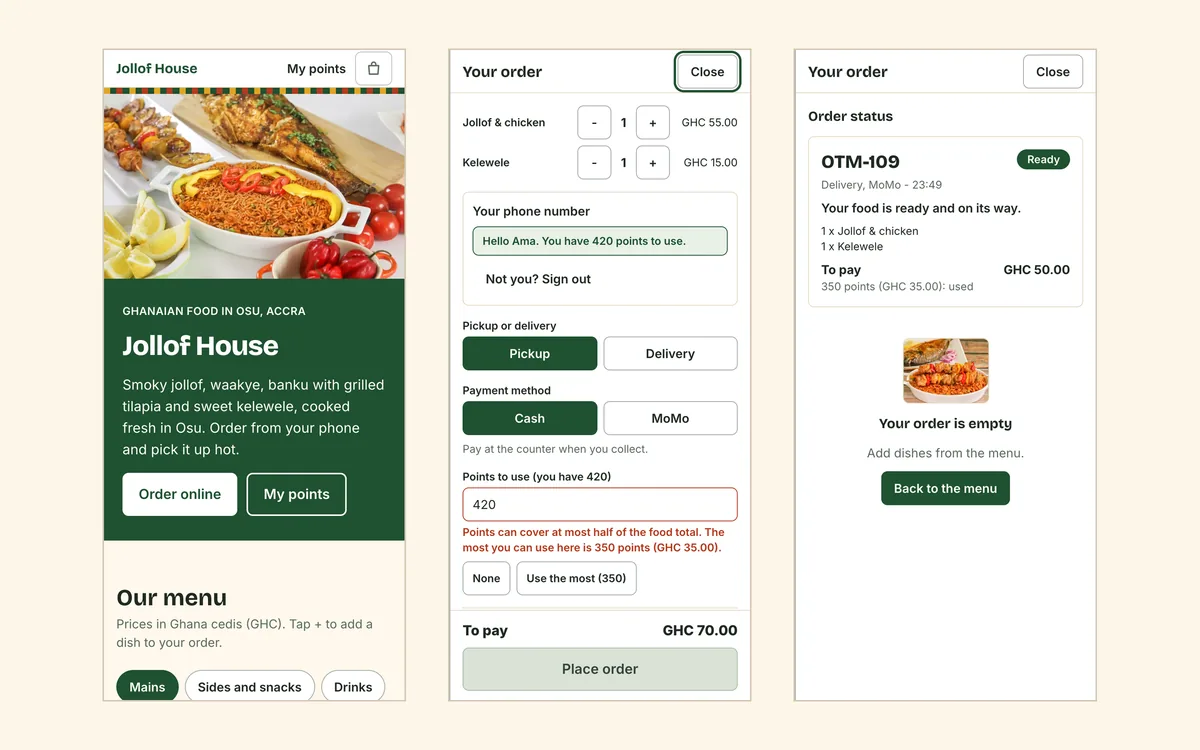
A restaurant ordering system built for Accra. Customers order on a phone or a kiosk, pay in cash or Mobile Money, and only paid orders reach the kitchen.
Problem
A busy restaurant takes orders in four places at once: at the till, on a kiosk, on the phone and for delivery. Many customers pay with Mobile Money (MoMo), so the cashier has to check the merchant phone before the food is cooked. Orders get lost, the kitchen cooks food nobody has paid for, and loyalty points are tracked on paper.
How it helps your business
- No unpaid orders in the kitchen. Cooks only see food that has been paid for.
- A faster till. The cashier scans or types a code instead of looking through a list.
- Fewer mistakes with MoMo. Parked orders keep a clear timer, and the cashier is reminded to check the merchant phone for the exact amount.
- Regulars come back. Customers can see their points, how much they are worth and when each batch expires.
What it does
- Order from a phone. Customers browse the menu with photos, add dishes to their cart and choose pickup or delivery. They pay in cash at the counter or by MoMo.
- A self-service kiosk. Customers tap their dishes, choose cash or MoMo and get an order code, such as OTM-101, to show at the till.
- A cashier screen. The cashier types an order's code or scans its QR code or barcode, and the order opens in about a quarter of a second. It shows the food, the delivery fee, points used and the money due. One button, Confirm Payment Received, sends it to the kitchen.
- Park MoMo orders. If a customer is still waiting for a MoMo prompt, the cashier sets the order aside as Waiting for MoMo and serves the next person.
- A kitchen screen. It shows paid orders only, with the food and nothing else: no prices, no phone numbers, no points. A cook taps Food Ready.
- Loyalty points. Customers earn 5% back as points, and 1 point is worth GHC 0.10. Points can pay for up to half of the food. They are held when the order is placed, deducted when payment is confirmed and returned if the order is cancelled. Points expire after 90 days, oldest first.
- Delivery. Customers give a street address and a landmark. Delivery is paid by MoMo only, with a delivery fee on top of the food.
- Wait times and the WiFi code. The wait time depends on how much was paid for food: 15, 30, 60 or 120 minutes. The WiFi code is printed on the receipt for pickup orders only.
Outcome
A working ordering system for a single restaurant.
A closer look
On a phone, from the menu to Ready. The kiosk: tap dishes, choose cash or MoMo. The cashier opens an order by code and confirms payment. The kitchen sees paid orders and food only. Points with expiry dates, used at checkout up to half the food.
How it's built
- Prices are checked on the server. The cart lives in the browser, but every order is re-priced from the menu before it's saved.
- Points follow a ledger. Each batch of points has its own date, so reserving, deducting, restoring and expiring always use the oldest points first and the balance can't go below zero.
- The kitchen is limited by role. The kitchen and cashier each sign in with their own PIN, a manager PIN also unlocks both and lets staff leave the customer kiosk, and the kitchen's data has no prices or customer details in it.
- Quick on a weak connection. The screens check for new orders at a steady interval, so a poor connection delays an update instead of breaking it.
Stack
Next.js (App Router), TypeScript, Tailwind CSS, Cloudflare Workers, Cloudflare D1, Zod and Vitest.
Want this for your business?
Send a short note on what you're building or the idea you have. I'll reply with questions and a rough plan. It's free, and I'd love to connect and help.
Typical timeline: 3 to 10 days · From $300. See Booking, ordering and quotes for your business