
Problem
Making one book-summary video means juggling a lot of pieces: a script split into narration chunks, dozens of scene prompts, a cover, a title and caption, and a set of vertical reels. They used to live in a long AI chat, a pile of folders and a spreadsheet. Nothing showed what was done, what was left, or what the audio would cost before the credits were spent.
What I built
A creator's workspace where the whole production kit for a video lives in one project. The real app sits behind a login, and a public demo with fully simulated AI and audio lets anyone click through it.
- Get the package. Run the AI Director inside the app, or paste a conversation from Gemini. Either way it is split into audio chunks, scenes, reels, covers and publishing text.
- Generate the narration. One audio file per chunk through ElevenLabs, with a credit and cost estimate before anything is spent. Save to a folder or download a ZIP.
- Work the visual board. Every scene has its image prompt, and a video prompt where it needs one, with copy buttons. A finished image or video is uploaded to the slot on its card. Filters show what is left to do.
- Finish the cover and SEO. The YouTube cover prompt, headline, title and caption sit in one place.
- Build the reels. A 9:16 kit with its own audio, board, cover and captions for each reel.
- Download everything. One click collects the assets.
The AI Director
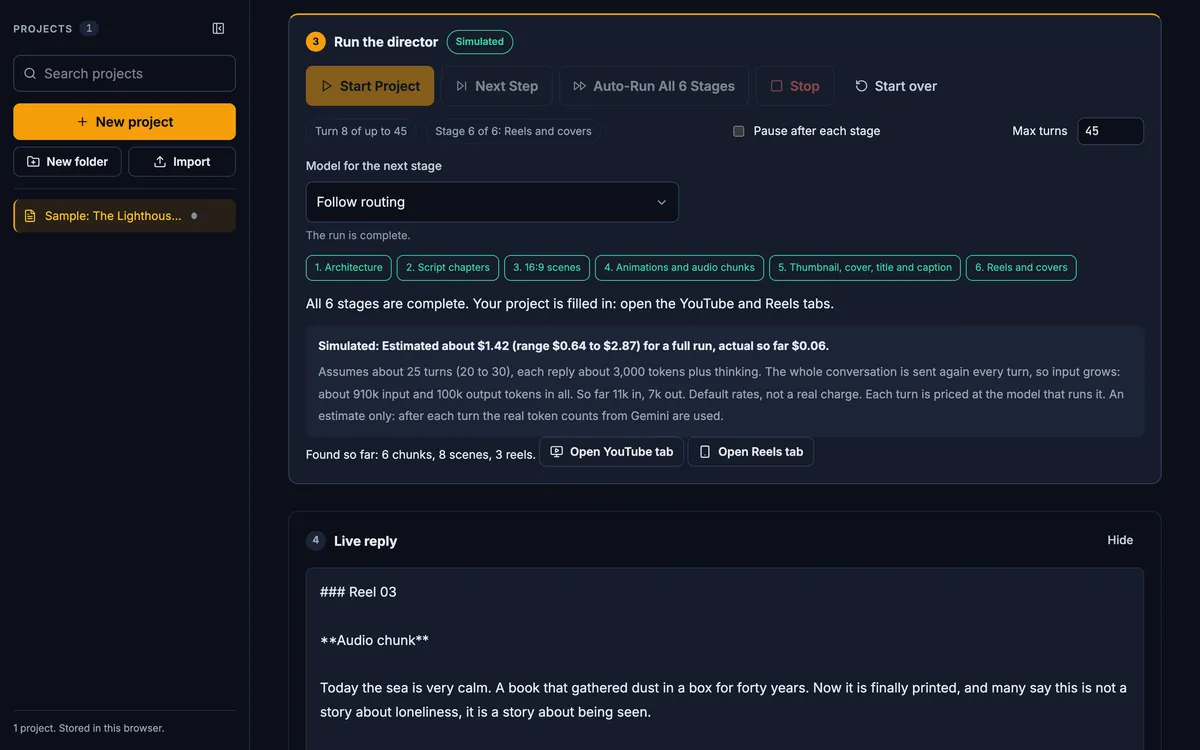
The director runs the work in 6 stages: architecture, script chapters, 16:9 scenes, animations and audio chunks, thumbnail and caption, and reels and covers. Each stage can use a different Gemini model, so the heavy steps and the light ones are not priced the same. The cost of every turn is shown, with an estimate for the full run up front, and the run can pause after each stage so a person can check it.
One Setup page
The Setup page is the one place for the ElevenLabs and Gemini keys, which stay in the browser. It also holds per-stage Gemini model routing, so cheap models do the bulk work and the strongest model is kept for architecture and script. The credit and token rates are editable, and they drive every cost estimate in the app.
Built for a team's daily use
- Safe sign-in. The first run sets a password and gives a recovery key.
- A Save bar with conflict detection. If the same project was changed somewhere else, the app says so instead of overwriting it.
- Per-card uploads are stored on Cloudflare R2, and bulk upload matches files to cards by name, like
scene_04.mp4orR01-cover.png. - Progress everywhere. Each tab shows how much is done, and a Next bar points to the next step.
Stack
Cloudflare Workers with D1 for project data and R2 for uploaded files, and a vanilla JavaScript front end with no framework. Gemini runs the director, and ElevenLabs makes the audio. A demo mode replaces both with simulated runs and placeholder tones, so it needs no keys and your files stay in your browser.
Outcome
A working tool covering the whole path from AI conversation to a finished upload kit, with 335 automated tests and a Playwright browser suite behind it. The demo uses a fictional sample book, and its audio and director run are simulated, so it shows the workflow rather than real AI output or real costs.