
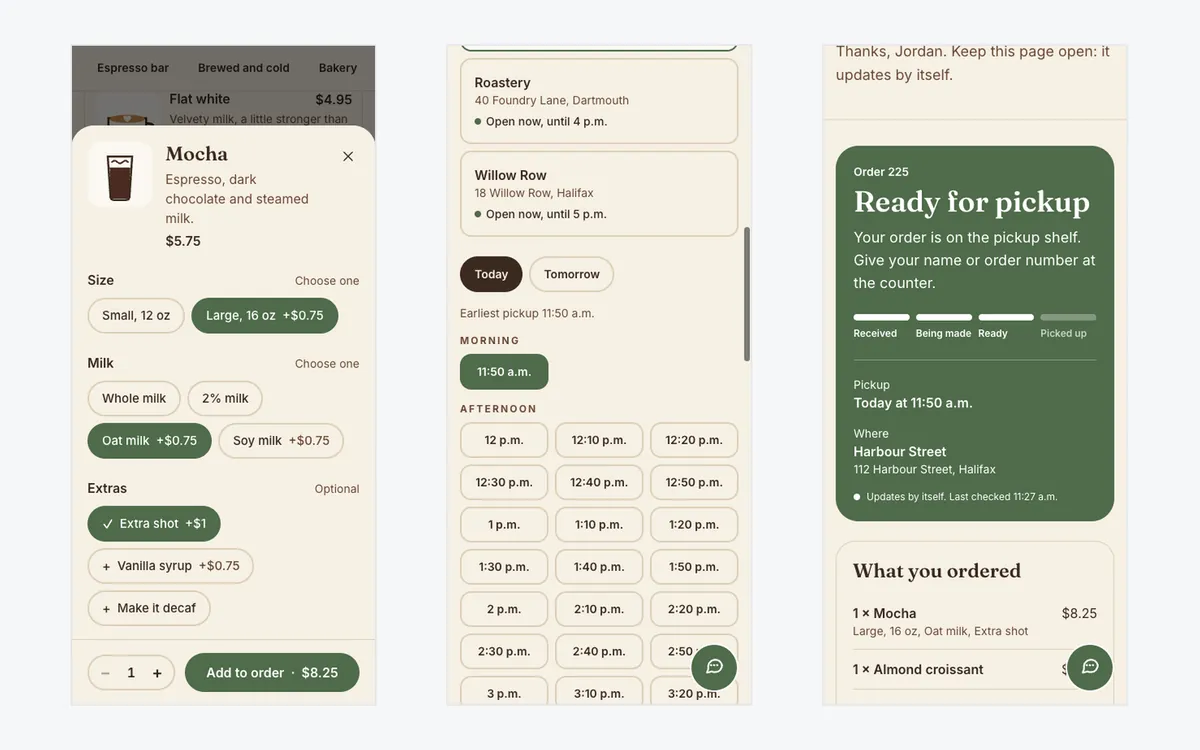
Northwind Coffee Co. is a fictional café and roaster in Halifax with three locations, a full menu with photos, and sample orders.
Problem
At a café, the morning rush is the whole business. Customers who see a line walk on to the next place, phone orders tie up the person on the till, and third-party ordering apps take a large cut of every order.
What it does
- Order from a phone. Customers pick a café, browse the menu with photos, and choose size, milk and extras, with the price updating as they go.
- Pickup times that respect the kitchen. Only times when the café is open and the kitchen has room are offered. Each time slot takes a limited number of orders, so a rush doesn't pile up at 8:00.
- A live kitchen screen. A tablet shows New, Preparing and Ready columns. New orders arrive highlighted within seconds, with an optional chime, and staff move them along with one big tap. Late orders turn red.
- "Ready for pickup" messages. When staff tap Ready, the customer's order page turns green on its own and they get an email or text.
- QR menus. Each café gets a printable menu QR code, and table cards that open the menu for that café and table.
- The owner's view. Today's orders by café, order value, a menu editor with options and prices, sold-out and seasonal items, and each café's own hours.
- It also has a support chat.
How it helps your business
- Shorter lines. Regulars order on the way and walk straight to the pickup shelf.
- No commission. Orders come in on your own site, not through an app that takes a cut.
- A calmer kitchen. Pickup times are spread out and every order is on one screen.
- Fewer "is my order ready?" questions, because customers can see it on their phone.
How it's built
- Prices are checked on the server. The basket lives in the browser, but every order is re-priced from the menu before it's saved, so nobody can change a price.
- No overbooked pickup times. Two phones racing for the last place in a time slot can't both get it; the second one sees fresh times.
- Works on café Wi-Fi. The kitchen screen checks for new orders every five seconds, which survives a flaky connection better than a live socket.
- Payments ready to add. The demo uses pay at pickup; orders already have room for an online payment, and the steps to add Stripe are written down.
Stack
Next.js (App Router), TypeScript, Tailwind CSS, Cloudflare Workers, Cloudflare D1 with Drizzle ORM, Zod and Vitest. QR codes are drawn in the app, with no outside service.
Outcome
A working order-ahead site for a small chain: order a large oat latte with an extra shot on your phone, then log in as the café owner, open the kitchen screen in another window, and watch the order arrive and turn ready.