
Problem
A solo business answers the same questions all day, takes bookings by chat and replies late at night. Most small businesses have no website, no booking system and no time for a new app. Their customers just message them.
What it does
- Answers as the owner. Customers message the business's regular account, with no bot to find and no Start button. The AI replies in the owner's voice and in the customer's language, using only what is in the sheet: hours, prices, services and a FAQ.
- Works with messy messages. A customer can type "hi whats ur hrs on sat?" or write fast, typo-filled French, and still get a clear answer. The owner does not need perfect sentences either.
- Asks the owner when it is not sure. The customer gets a short "Got your message, I'll get back to you soon". The owner gets a card in a private admin chat with a draft reply and the reason, and taps Send, or types a few rough words like "yes chrome 15 extra, fri sat only" and the AI writes the reply properly. Remember this adds the answer to the FAQ for next time.
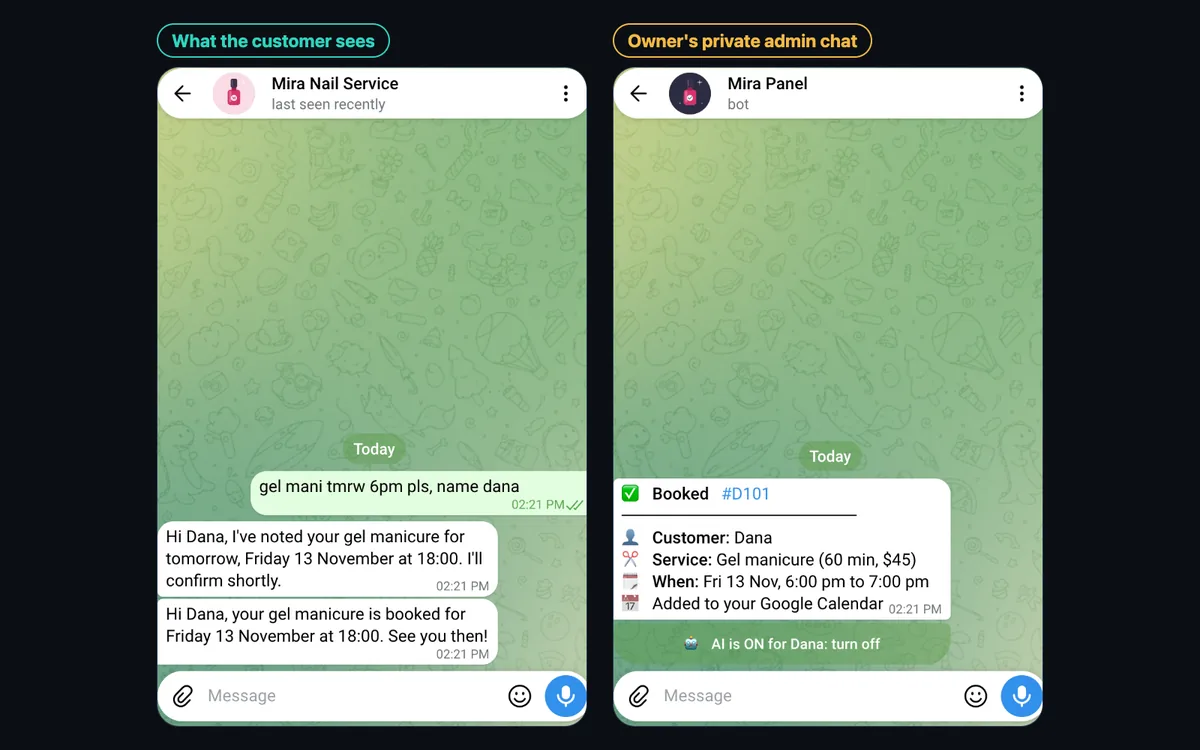
- Takes bookings. It asks only for what is missing, checks the real free times from the sheet (opening hours, breaks, days off and every pending or confirmed booking) and sends the owner a booking card: Approve, Other time, Full or decline.
- Adds approved bookings to Google Calendar. One tap on Approve confirms the booking to the customer, saves it in the sheet and creates the event in the owner's own Google Calendar.
- Follows the owner's rules. A Rules tab takes plain sentences, like "never give the exact address before a booking is confirmed" or "ask me before offering a discount", and the AI follows them even if a customer pushes back.
A private admin chat, separate from your customers
The owner controls everything from a private admin chat, a second Telegram chat that only the owner can use. It holds the draft cards and the Send, Approve and Other time buttons, and it switches the AI on or off for any customer or for everyone. It is the owner's control panel, not what customers talk to, and customers never see it. The owner can also jump into any customer chat and reply personally at any time. If a customer asks outright whether they are talking to an AI, it says so honestly and offers to pass the message on.
One Google Sheet is the whole back office
Business details, services, opening hours and breaks, days off, the FAQ, the rules, the bookings, the conversation log and a summary are all tabs in one sheet. Change a cell and the next answer changes. There is nothing else to learn or host.
Built so nothing goes wrong quietly
- No guessing: facts come only from the sheet and the owner's own words, never invented.
- A person in the loop: complaints, health or allergy questions, money and discounts always go to the owner first.
- Retries, then an alert: every step retries, and if the AI is down the customer still gets a holding reply while the owner gets the question.
- No double bookings: a booking can be approved only once, and every pending or confirmed booking blocks its time.
- A full log: every message, who handled it and what the AI cost, in the sheet.
Connects to the account you already use
The same flow runs on the owner's own Telegram account (through Telegram Business), a WhatsApp Business number or a business phone number for texts. Only the small step that receives and sends messages differs, and it is set up with the client's own accounts. In this demo the customer side runs on a demo Telegram bot standing in for the business account.
Stack
An n8n workflow with the decision logic written as plain, tested JavaScript. Claude writes the replies and drafts in a fixed format, so the workflow never guesses at free text. Telegram carries the customer chat and the owner's admin chat, Google Sheets holds the back office, and Google Calendar receives the approved bookings.
Outcome
A working demo for a fictional one-person nail studio, tested with messy messages in English and French: opening hours with a typo, a service that is not in the sheet, a complaint, a booking at a free time and at a taken time, a request for the exact address, a customer asking whether they are talking to a bot, and the AI switched off for one customer and back on. Each ended where it should, including a booking approved with one tap that appeared in the Google Calendar, and 22 automated tests cover the decision rules.
The AI cost about US$0.0006 per answer in testing, a fraction of a cent, and for a busy solo business the assistant saves a lot of time every day.