
Problem
New leads come in by form and by email. Someone has to read each one, look up the person, type it into the CRM (your list of customers and deals), decide who to call first and write back. It takes about eight minutes per lead (my estimate), and the hot leads wait the longest.
How it helps your business
- Hot leads hear back first. They get an instant reply, and you get a Call now alert on your phone.
- No more typing leads into the CRM. Contacts, deals and notes are saved for you.
- Follow-ups happen on their own. Warm leads get emails on day 2 and day 5, and they stop when the lead replies.
- Time back. At about eight minutes per lead (my estimate), that is roughly 13 hours a month for 100 leads.
What it does
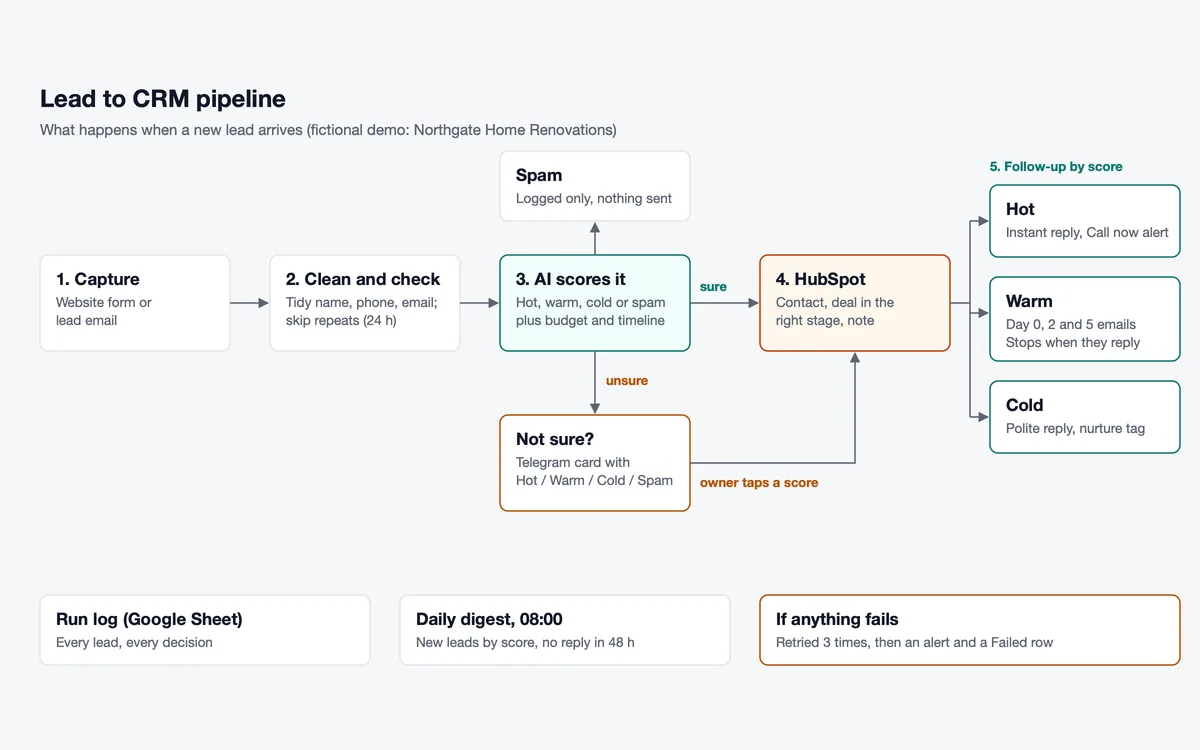
- Captures the lead. Leads come in from your website form, through a protected link, or from emails in a labelled folder.
- Cleans it. Names, phone numbers and messy typing are tidied. If the same person sends twice within 24 hours, the repeat is skipped.
- Scores it. The AI marks it hot, warm, cold or spam, and notes the service, budget, timeline and language. Spam is only logged.
- Saves it to the CRM. The contact is created or updated, and a deal is added in the right sales stage for its score. A note records what the AI saw.
- Follows up by score. Hot: an instant personal reply and a Call now alert on the owner's phone. Warm: an email now and follow-ups on day 2 and day 5, which stop as soon as the lead replies. Cold: a polite reply and a tag for later follow-up.
- Logs everything. Every run is written to one sheet. A daily summary at 08:00 lists new leads by score and the ones nobody has answered in 48 hours.
When it isn't sure, it asks
When the AI is less sure than the level you set, nothing is sent. The owner gets a message with the AI's guess, its reason and four buttons: Hot, Warm, Cold and Spam. One tap and it carries on. If the owner picks a different score, the reply is rewritten to fit. If there is no answer in 24 hours, the lead is saved under a Needs review stage and nothing goes out.
Built so nothing goes wrong quietly
- No duplicates: the log is the memory, so a repeat lead is skipped. CRM contacts are matched by email, so they never double up.
- Retries, then an alert: every step that calls another app retries three times. Then the owner is alerted by email and phone, and a Failed row is added to the log.
- A person in the loop: the AI never acts on a score it is unsure about.
- Safe with messy text: the AI answers in a fixed format and treats the lead's message as information, not instructions.
- A full log: every lead, its score, the decision and the AI cost, in one sheet.
Plugs into what you already use
The demo uses the free HubSpot CRM, Telegram and Google Sheets, and the same patterns work with other CRMs and tools. The workflow runs in the client's own account.
Outcome
The end-to-end test for Northgate Home Renovations, a home renovation company, is done: 12 messy leads (typos and capitals, no phone number, phone only, French, spam, a duplicate, a vague lead and an email lead) went through n8n, the CRM, the sheet and email, and all 12 passed, 20 of 20 checks, with 0 failed n8n runs. The French lead was answered in French, spam sent no email and never reached the CRM, the duplicate made one contact and one deal, the vague lead waited for the owner, and a lead that replied stopped its follow-ups. The AI scoring scored 11 of 11 as expected, and the code steps pass 47 of 47 unit tests.
The test ran locally with test mail. The owner's review step ran through the review link, not real Telegram button taps, and the email lead was tested through the same link with the Gmail message shape, so live Telegram taps and Gmail intake are not claimed here.
The AI cost about US$0.00035 per lead, measured in testing. The time saved is an estimate: at about eight minutes per lead, that is roughly 13 hours a month for 100 leads. Running costs are also estimates: n8n self-hosted from about US$5 a month, with the free HubSpot CRM.